Tag: csp-ants&stp

  • WordPress Content Security Policy (2)

    WordPress Content Security Policy (2)

    ครั้งก่อนนำเสนอปลั๊กอิน CSP-ANTS&STP ซึ่งปัจจุบันได้เปลี่ยนชื่อเป็น CSP Friendly Security แต่ถึงจะมีการปรับปรุงแล้วก็อาจเกิด Header Overflow ได้ในอนาคต ดูผลลัพธ์ของ CSP ที่ได้เป็นดังภาพ

    ซึ่งหลังจากคุยกับ Gemini ก็ได้รับคำแนะนำให้เปลี่ยน เนื่องจากมีโอกาสเกิด Header Overflow ได้ (ถึงแม้จะมีขนาดใหญ่มาก 8KB ถึง 16KB) ก็เลยให้เขียนใหม่ปรับปรุงจากรุ่นเดิมของ CSP Friendly Security โดยใช้ z.ai และ gemini.google.com ปรับปรุง

    สิ่งที่ต้องมี

    1. Woody snippets
    2. สร้าง new php snippets ใส่โค้ดต่อไปนี้แล้วเปลี่ยนเป็น run everywhere แล้วกดบันทึกให้เรียบร้อย
    CSP {PHP}
    add_action('template_redirect', 'csp_controller');
    
    function csp_controller() {
        // ตรวจสอบว่าเป็นหน้า Admin หรือหน้าเป้าหมายหรือไม่
        $target_pages = array('cd-key');
        if (is_admin() || is_page($target_pages)) {
            // ส่ง Simple Header แล้วจบการทำงานทันที (ไม่เปิด Buffer)
            if (!headers_sent()) {
                header("Content-Security-Policy: upgrade-insecure-requests");
            }
            return;
        }
    
        if (function_exists('litespeed_autoload')) {
            add_filter('litespeed_buffer_after', 'process_csp_buffer', 0);
        } else {
            ob_start('process_csp_buffer');
        }
    }
    
    function process_csp_buffer($content) {
        // ตรวจสอบว่าเป็นหน้า Admin หรือหน้าเป้าหมายหรือไม่
        $target_pages = array('cd-key');
        if (is_admin() || is_page($target_pages)) {
            return $content;
        }
    
        // สร้าง Nonce
        $nonce = base64_encode(random_bytes(16));
    
        // แทรก Nonce (ใช้รหัส Hex เพื่อหลบ Editor บั๊ก)
        $pattern = '#<(script|style)(?![^>]*\bnonce=)(?![^>]*\btype=[\x22\x27]application/(ld\+json|json)[\x22\x27])([^>]*)>#i';
        $content = preg_replace($pattern, "<$1 nonce='" . $nonce . "'$3>", $content);
    
        $sha256_csp = get_event_hashes($content);
        $uris = get_allowed_domains($content);
        $uri_string = implode(' ', $uris);
    
        $script_src = "script-src https: 'strict-dynamic' 'nonce-" . $nonce . "'";
        if (!empty($sha256_csp)) {
            $script_src .= " " . $sha256_csp;
        }
    
        // สร้าง Full CSP Header
        $csp_header = sprintf(
            "Content-Security-Policy: base-uri 'self' %s data:; object-src 'none'; %s; frame-ancestors 'none';",
            $uri_string,
            $script_src
        );
    
        if (!headers_sent()) {
            header($csp_header);
        }
    
        return $content;
    }
    
    // --- ฟังก์ชัน Helper (คงเดิม) ---
    
    function get_event_hashes($output) {
        $sha256 = array();
        if (preg_match_all('#\s(onload|onclick)\s*=\s*([\x22\x27])(.+?)\2#is', $output, $matches)) {
            foreach ($matches[3] as $event_code) {
                if (!empty($event_code)) {
                    $sha256[] = base64_encode(hash('sha256', $event_code, true));
                }
            }
        }
        if (class_exists('autoptimizeConfig')) {
            $sha256[] = base64_encode(hash('sha256', "this.onload=null;this.media='all';", true));
        }
        if (empty($sha256)) return '';
        $unique_hashes = array_unique($sha256);
        $formatted_hashes = array();
        foreach ($unique_hashes as $h) {
            $formatted_hashes[] = "'sha256-" . $h . "'";
        }
        return "'unsafe-hashes' " . implode(' ', $formatted_hashes);
    }
    
    function get_allowed_domains($string) {
        $result = array();
        $domains = array(
            'https://secure.gravatar.com/avatar/',
            'https://fonts.googleapis.com/',
            'https://maxcdn.bootstrapcdn.com/',
            'https://cdn.jsdelivr.net/'
        );
        foreach ($domains as $domain) {
            if (strpos($string, $domain) !== false) {
                $result[] = $domain;
            }
        }
        return $result;
    }
    1. เมื่อไปทดสอบที่ https://securityheaders.com/
    2. ก็จะได้ CSP ใหม่ที่สั้นลง
    content-security-policybase-uri ‘self’ data:; object-src ‘none’; script-src https: ‘strict-dynamic’ ‘nonce-sdfadsdfasdfadsfadsfa==’; frame-ancestors ‘none’;
    1. ก็ยังมี recomendation ที่ต้องปรับปรุงอีกนิดหน่อยค่อยๆ ทำไป
    2. จบ… ขอให้สนุก
  • WordPress Content Security Policy

    WordPress Content Security Policy

    1. CSP สำหรับ WordPress ค่อนข้างยุ่งยาก ปรับโน่นนิดปิดนี่หน่อย เว็บเพี้ยน
    2. เมื่อลองค้นไป ก็เจอปลักอินอยู่ตัวนึง ที่ช่วยสร้าง CSP ให้อัตโนมัติ นั่นคือ CSP-ANTS&STP แต่เนื่องจากปลักอินตัวนี้ไม่ได้รับการปรับปรุงมาตั้งแต่ 2022 ซึ่งนานเกินไป แล้ว แต่จริงๆ มันยังใช้ได้อยู่
    3. แต่ปลั๊กอินก็ยังมีบักเมื่อไปตรวจกับเว็บ https://securityheaders.com แล้วจะมีข้อความเตือนดังภาพ
    1. เพื่อแก้ปัญหานี้เลยต้องเขียนปลักอินตัวนี้ลงในปลักอินอีกตัวที่ชื่อ Woody snippets
    2. คลิก Add ใน Woody snippets เพิ่มข้อความต่อไปนี้ ส่วนนี้ได้แก้ไข Error บน https://securityheaders.com แล้วด้วย
    /**
    * Plugin Name:       CSP-ANTS&ST
    * Description:       Add a nonce to each script and style tags, and set those nonces in CSP header
    * Version:           1.1.1
    * Requires at least: 5.9
    * Requires PHP:      7.3
    * Author:            Pascal CESCATO
    * Author URI:        https://pascalcescato.gdn/
    * License:           GPL v2 or later
    * License URI:       https://www.gnu.org/licenses/gpl-2.0.html
    */
    
    add_action('send_headers', function () {
    if (is_admin()){
        header("Content-Security-Policy: upgrade-insecure-requests");
        return;
    } 
    //เลือก page ที่ไม่ต้องการให้ CSP ทำงาน
    if (is_page(['cd-key'])){
        header("Content-Security-Policy: upgrade-insecure-requests");
        return;
    } 
    
    if (function_exists('litespeed_autoload')):
    // lscache version
    function cspantsst_cspantsst_lscwp_check ( $content ) {
    
    $uris = implode ( ' ', cspantsst_search_for_sources ( $content ) );
    
    $sha256_csp = cspantsst_search_for_events ( $content );
    
    $nonces = [];
    
    $content = preg_replace_callback ( '#<script.*?\>#', function ( $matches ) use ( &$nonces ) {
    $nonce = wp_create_nonce ( $matches[ 0 ] );
    $nonces[] = $nonce;
    
    return str_replace ( '<script', "<script nonce='{$nonce}'", $matches[ 0 ] );
    }, $content );
    
    $content = preg_replace_callback ( '#<style.*?\>#', function ( $matches ) use ( &$nonces ) {
    $nonce = wp_create_nonce ( $matches[ 0 ] );
    $nonces[] = $nonce;
    
    return str_replace ( '<style', "<style nonce='{$nonce}'", $matches[ 0 ] );
    }, $content );
    
    $nonces_csp = array_reduce ( $nonces, function ( $header, $nonce ) {
    return "{$header} 'nonce-{$nonce}'";
    }, '' );
    
    header ( sprintf ( "Content-Security-Policy:  base-uri 'self' %1s data:; object-src 'none'; script-src https:%2s %3s 'strict-dynamic'; frame-ancestors 'none'; ", $uris, $nonces_csp, $sha256_csp ));
    return $content;
    }
    
    add_filter ( 'litespeed_buffer_after', 'cspantsst_cspantsst_lscwp_check', 0 );
    
    else:
    // otherwise
    add_action ( 'template_redirect', function () {
    
    ob_start ( function ( $output ) {
    
    $uris = implode ( ' ', cspantsst_search_for_sources ( $output ) );
    
    $sha256_csp = cspantsst_search_for_events ( $output );
    
    $nonces = [];
    
    $output = preg_replace_callback ( '#<script.*?\>#', function ( $matches ) use ( &$nonces ) {
    $nonce = wp_create_nonce ( $matches[ 0 ] );
    $nonces[] = $nonce;
    return str_replace ( '<script', "<script nonce='{$nonce}'", $matches[ 0 ] );
    }, $output );
    
    $output = preg_replace_callback ( '#<style.*?\>#', function ( $matches ) use ( &$nonces ) {
    $nonce = wp_create_nonce ( $matches[ 0 ] );
    $nonces[] = $nonce;
    return str_replace ( '<style', "<style nonce='{$nonce}'", $matches[ 0 ] );
    }, $output );
    
    $header = '';
    $nonces_csp = array_reduce ( $nonces, function ( $header, $nonce ) {
    return "{$header} 'nonce-{$nonce}'";
    }, '' );
    
    header ( sprintf ( "Content-Security-Policy: base-uri 'self' %1s data:; object-src 'none'; script-src https:%2s %3s 'strict-dynamic'; frame-ancestors 'none';", $uris, $nonces_csp, $sha256_csp ) );
    return $output;
    } );
    } );
    endif;
    
    function cspantsst_search_for_events ( $output ) {
    
    $sha256 = array ();
    
    preg_match_all ( '/onload="(?<onload>[^"]+)"|onclick="(?<onclick>[^"]+)"/', $output, $matches );
    foreach ( $matches[ 'onload' ] as $match ):
    if ( !empty ( $match ) )
    $sha256[] = base64_encode ( hash ( 'sha256', $match, true ) );
    endforeach;
    foreach ( $matches[ 'onclick' ] as $match ):
    if ( !empty ( $match ) )
    $sha256[] = base64_encode ( hash ( 'sha256', $match, true ) );
    endforeach;
    
    if ( class_exists ( 'autoptimizeConfig' ) ):
    $sha256[] = base64_encode ( hash ( 'sha256', "this.onload=null;this.media='all';", true ) );
    endif;
    
    
    $header_sha256 = "'unsafe-hashes'";
    $sha256_csp = array_reduce ( $sha256, function ( $header, $sha256_item ) {
    return "{$header} 'sha256-{$sha256_item}'";
    }, '' );
    
    if ( !empty ( $sha256_csp ) )
    $sha256_csp = $header_sha256 . $sha256_csp;
    
    return $sha256_csp;
    }
    
    function cspantsst_search_for_sources ( $string ) {
    
    $result = array ();
    if ( strpos ( $string, 'https://secure.gravatar.com/avatar/' ) ):
    $result[] = 'https://secure.gravatar.com/avatar/';
    endif;
    if ( strpos ( $string, 'https://fonts.googleapis.com/' ) ):
    $result[] = 'https://fonts.googleapis.com/';
    endif;
    if ( strpos ( $string, 'https://maxcdn.bootstrapcdn.com/' ) ):
    $result[] = 'https://maxcdn.bootstrapcdn.com/';
    endif;
    return $result;
    
    }
    });
    1. และใน code นี้มีส่วนของโค้ดที่ใช้ระบุหน้าที่ไม่ต้องการให้ CSP-ANTS&STP ทำงานด้วย เนื่องจากการกำหนด CSP บางครั้งอาจทำให้เว็บไม่สามารถทำงานได้อย่างที่ต้องการ ต้องปรับลดความปลอดภัยลงให้เหลือ upgrade-insecure-requests แทนโค้ดดังกล่าวคือ
    if (is_page(['cd-key'])){
        header("Content-Security-Policy: upgrade-insecure-requests");
        return;
    } 
    
    1. แล้วเลื่อนลงมาในส่วนของ Base options เลือกเป็น Run everywhere
    1. กด Save
    2. และมาตรวจสอบในหน้า Woody snippets ว่าเปิดใช้งานดังภาพแล้วหรือยัง
    1. ทดสอบด้วยการไปเช็คด้วย https://securityheaders.com/ ก็จะได้ A+ เย่..
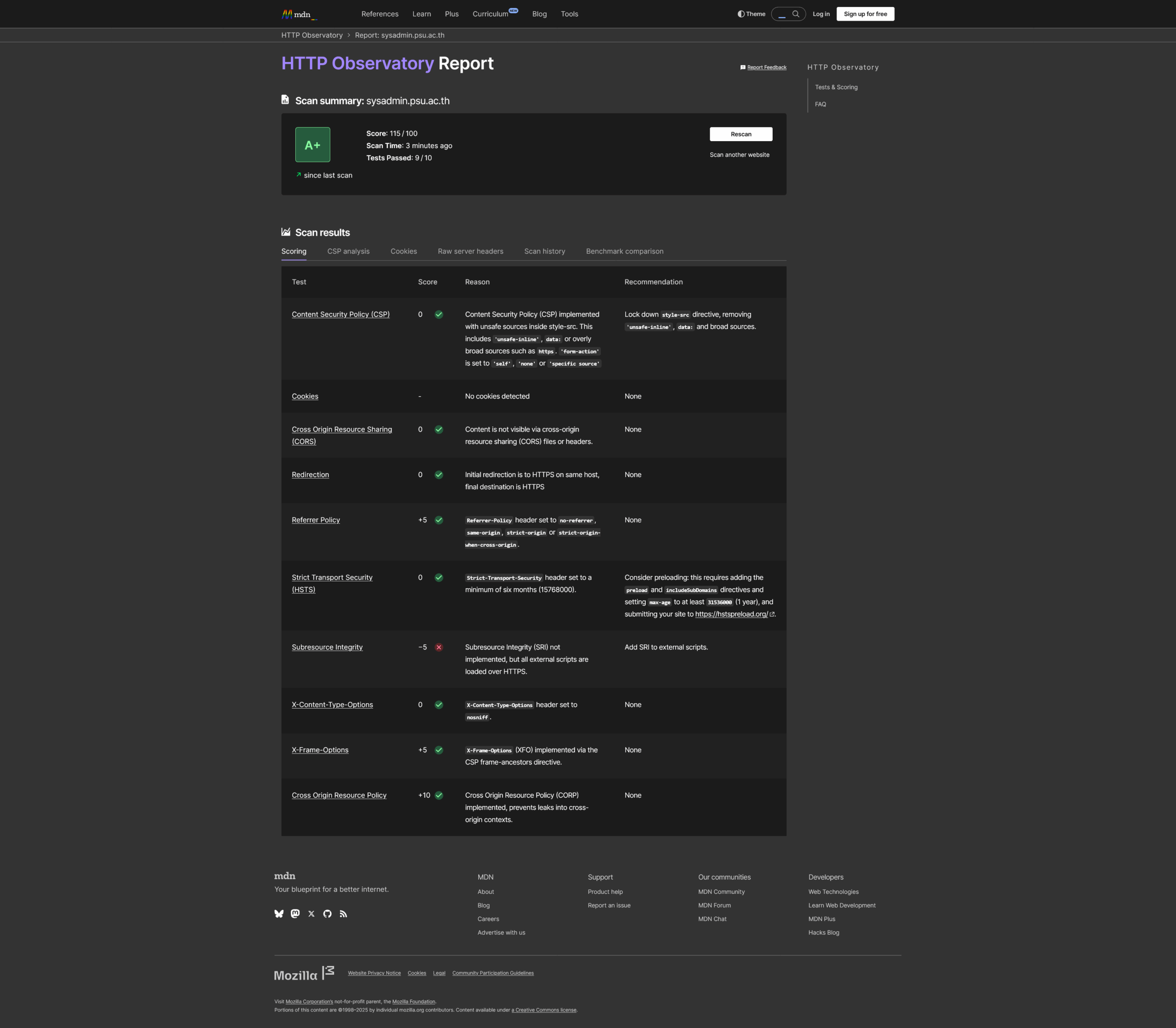
    1. แถม https://developer.mozilla.org/en-US/observatory/ อีกเว็บนึง เมื่อติดตั้งโค้ดของ CSP ก็สามารถทำคะแนนที่ดีขึ้นทันตาเห็น
    1. สุดท้ายก็สามารถ ถอนปลักอิน CSP-ANTS&STP ออกจากเว็บไซต์ได้เลย ต้องขอบคุณคนเขียนปลักอินตัวนี้จากใจจริง
    2. จบ.
    3. ขอให้สนุก..